5 Best Flashcard Apps for Students in 2026

I spent the last month testing every popular flashcard app I could find. Some were great. Some charged $20/month for features you can get elsewhere for $5. Here's what I learned.
The 4-minute video version of this comparison. Same six apps, same four questions, same verified prices.
Look, I get it—you're busy. You don't have time to download 10 apps and figure out which one doesn't waste your time or money. So I did it for you. I tested these apps with actual study materials: a 40-page biology PDF, some handwritten notes I photographed, and a recorded lecture. Here's how they compared.
Quick Answer
- Want free + powerful? Anki. Ugly but unbeatable.
- Want AI without overpaying? Laxu AI. $4.99/month does what $20/month apps do.
- Already paying for Quizlet? Its Plus plan reads PDFs and lecture audio now — and is cheaper than Laxu AI if you pay yearly.
- Have money to burn? StudyFetch. Popular, but honestly overpriced.
- Studying for MCAT/LSAT? Brainscape. Good pre-made decks.
What actually matters in a flashcard app
After testing all these apps, here's what I actually cared about:
- Does it have spaced repetition? This is non-negotiable. If the app doesn't space out your reviews intelligently, you're wasting time. Here's why spaced repetition matters.
- How fast can I make cards? I have a 50-page PDF. I'm not typing 200 flashcards by hand. Either give me AI or give me a really fast manual system.
- Can I study on my phone? I do most of my studying on the bus. No mobile app = no deal.
- Can I get my cards out? If I spend hours making cards, I want to own them. Export to Anki format is ideal.
The apps I tested
1. Anki - The OG (free, ugly, powerful)
Every med student I know uses Anki. There's a reason for that—it works. The spaced repetition algorithm is the best out there, and there are literally millions of shared decks you can download for free.
But here's the thing: Anki looks like it was designed in 2005 (because it was). The learning curve is steep. I spent an hour just figuring out how to set it up properly. And if you want AI to help make cards? You'll need to install add-ons, and even then it's clunky.
What I liked: Free on desktop and Android. The spaced repetition actually works—I remembered things weeks later. Tons of add-ons if you're into customization. Huge library of shared decks (someone's already made cards for your textbook, probably).
What I didn't like: Took me forever to figure out. The iOS app costs $25 (yes, really). No AI unless you hack together some add-ons. The interface... let's just say it has "character."
Who should use it: If you're in med school, law school, or learning a language long-term, just learn Anki. The time investment pays off. For everyone else, there are easier options now.
Cost: Free (but $25 on iPhone)
I wrote a detailed Anki vs Laxu AI comparison if you're deciding between the two.
2. StudyFetch - Big name, big price tag
StudyFetch is everywhere on TikTok and Instagram. 7 million students use it. The AI is solid—I uploaded my biology PDF and it generated decent flashcards in about a minute.
But then I saw the price: $19.99/month on its US App Store listing. For flashcards.
Look, the app is good. The AI works. But when I found out other apps do the same thing for $4.99/month, I felt like I'd almost gotten ripped off. StudyFetch is banking on their brand and marketing, not on being the best value.
What I liked: The AI actually understood my PDF. Multiple study modes. Slick interface. The quiz feature is nice.
What I didn't like: $19.99/month is steep for a student budget. StudyFetch does have a free tier, but it never says anywhere I could reach how many uploads that actually gets you, and studyfetch.com blocks automated access to its own pricing page — the App Store listing is the only figure I can point you at.
Who should use it: If your parents are paying and you like the interface, go for it. Otherwise, keep reading.
Cost: $19.99/month, $29.00/quarter, or $96/year — which works out at $8/month (US App Store listing)
3. Laxu AI - Same features, quarter of the price
Here's what surprised me: Laxu AI does basically everything StudyFetch does, but costs $4.99/month instead of $19.99.
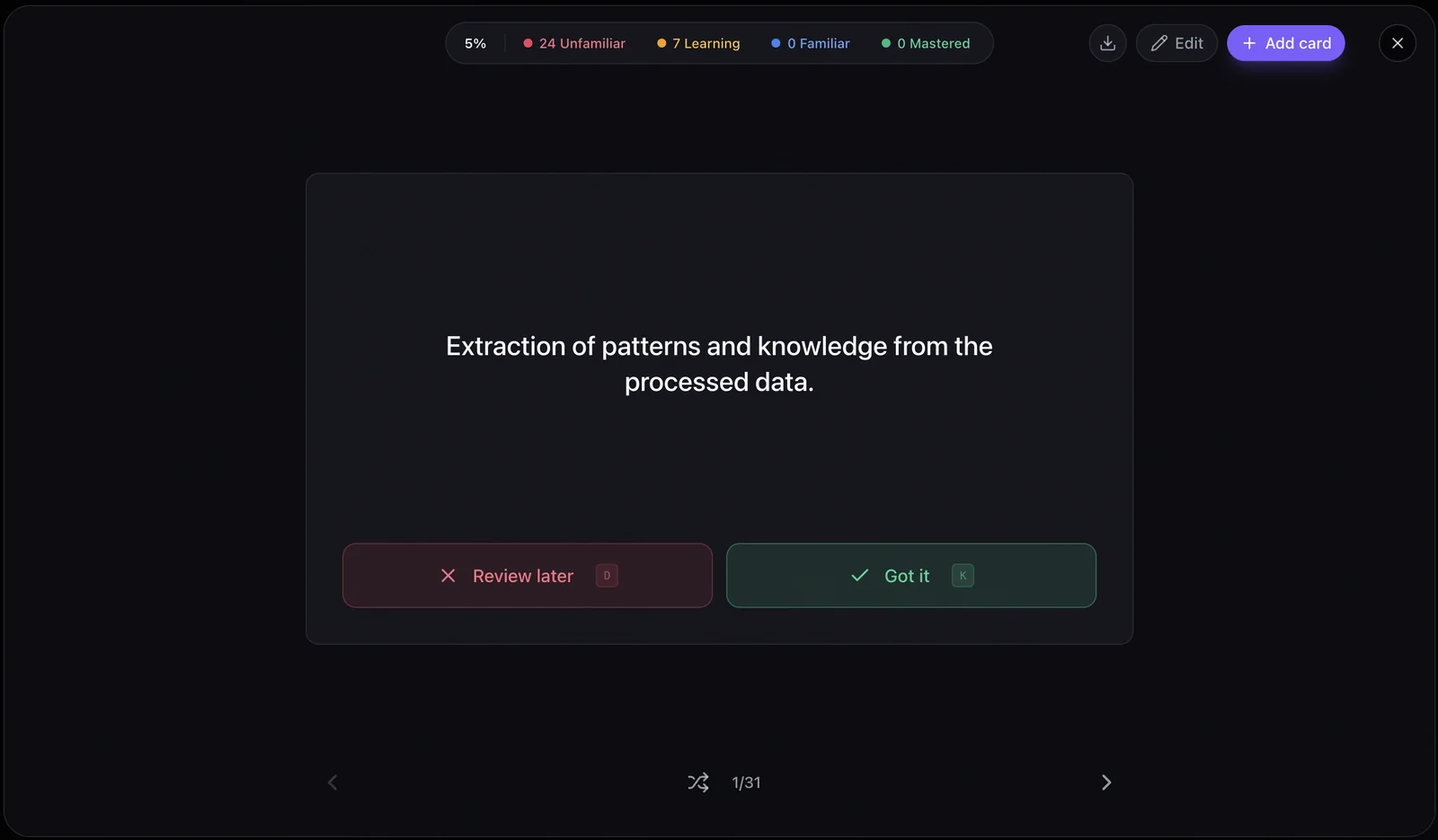
I uploaded the same biology PDF. Got flashcards in about a minute. The quality was comparable—maybe even slightly better because it also generated a summary and quiz questions alongside the cards.
The thing I actually appreciated: you can also make your own cards manually. So when the AI generates 25 cards from your PDF, you can add 5 more that phrase things the way your professor likes to ask questions. That flexibility is underrated.
What I liked: AI works on PDFs, photos of notes, even audio recordings of lectures. You can create manual cards too (like Anki, but the interface doesn't make you want to cry). Exports to Anki if you ever want to switch. Has an AI tutor that answers questions about your study materials—actually useful when you're stuck on a concept. And the price—$4.99/month is reasonable, and there's a $1.99/week plan if you just need it for finals.
What I didn't like: It's newer, so there's no big library of shared decks like Anki has. You're mostly making your own cards (or having AI make them).
Who should use it: Anyone who has PDFs, lecture slides, or notes they want to turn into flashcards without spending $20/month or typing everything manually. Honestly, this is what I'd recommend to most students.
Cost: First upload free. Then $1.99/week, $4.99/month, or $39.99/year.
Try uploading a PDF — it's free for your first one, no credit card needed.
4. Turbo AI - Another $20/month option
Turbo AI is similar to StudyFetch. AI flashcard generation, quizzes, the whole package. They claim 5 million users.
The AI worked fine when I tested it. But at $19.99/month, I had the same reaction as with StudyFetch: why am I paying this much when cheaper alternatives exist?
What I liked: Clean interface. AI generates decent cards. Has progress tracking and analytics.
What I didn't like: Not being able to see the price before signing up, and no published limits on the "generous free tier" the homepage advertises. The figure only shows up once you hit the upgrade prompt inside the app: $20/month, or $10/month billed yearly on what the app labels a promotional rate (checked August 2026).
Who should use it: If you've tried Laxu AI and StudyFetch and somehow neither worked for you, Turbo AI is another option. But honestly, they're all doing the same thing at this point.
Cost: $20/month, or $10/month billed yearly on a rate the app itself labels promotional. There's no public pricing page — the figure only appears in the in-app upgrade prompt, where I checked it in August 2026.
5. Brainscape - Good for standardized tests
Brainscape is different from the others. It does have AI generation — its subscriptions page takes PowerPoint, PDF, Word, Excel, YouTube videos and photos of text — but the selling point is the professionally-made decks for things like MCAT, LSAT, GRE, and bar exam prep.
You rate each card 1-5 based on how well you knew it, and it adjusts the repetition accordingly. Simple and effective.
What I liked: The pre-made decks are actually good quality. Interface is clean. The confidence-based system makes sense.
What I didn't like: If you're not studying for a standardized test, the value proposition drops. And $19.99 billed monthly is the second-priciest thing on this page — you only reach $7.99/month by committing to a full year.
Who should use it: MCAT, LSAT, or bar exam students who want ready-made decks without making their own cards.
Cost: Free tier covers unlimited flashcards, spaced repetition and capped AI generation. Pro is $19.99/month, $59.94 for six months ($9.99/month), or $95.88 a year ($7.99/month), with a $199.99 lifetime option.
Two more you'll see recommended
I tested five apps, but two others come up constantly when students ask this question, and leaving them out would be dishonest.
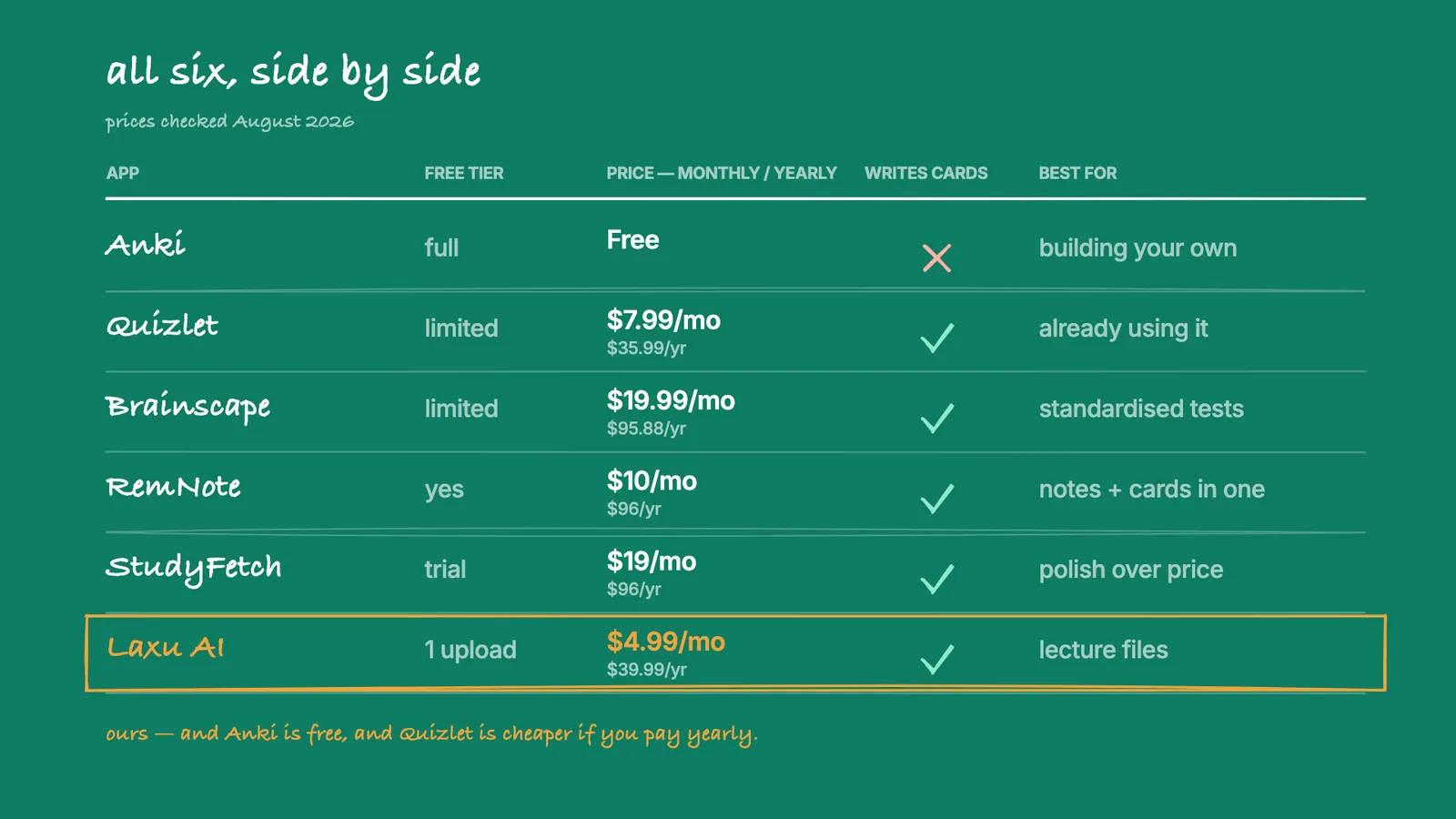
Quizlet is the biggest name in flashcards, and in 2026 it caught up on AI. Quizlet Plus ($7.99/month or $35.99/year) now reads PDFs, slides, photos of notes and — since July 2026 — lecture recordings through Magic Notes. Two honest notes: the audio feature gives free accounts one recording before it's Plus-only, and it doesn't work in the mobile browser at all. It has no AI tutor and no study podcast. But if you already pay for Quizlet, you may not need anything else on this page — and its yearly price is lower than Laxu AI's $39.99.
RemNote is a notes app that turns your outline into flashcards as you write. Pro is $10/month or $96/year; the tier with AI generation is $20/month or $216/year. It's the right pick if you'd rather not maintain a notes app and a flashcard app separately. It's the wrong pick if your material is PDFs and recordings rather than notes you type yourself.
Comparison tables
At a glance
| App | Best For | Monthly Price | AI Features | Value Rating |
|---|---|---|---|---|
| Anki | Long-term memorization | Free (iOS $25) | Add-ons only | ★★★★★ 5/5 |
| Laxu AI | AI + manual cards | $4.99/mo | AI + manual | ★★★★★ 5/5 |
| StudyFetch | Full AI suite | $19.99/mo ($8 yearly) | Core feature | ★★★★★ 3/5 |
| Turbo AI | AI study tools | $20/mo (in-app only) | Core feature | ★★★★★ 3/5 |
| Brainscape | Test prep | $19.99/mo ($7.99 yearly) | Yes, capped on free | ★★★★★ 3/5 |
Monthly vs yearly — a different comparison
Month-to-month and paying the year up front rank these apps differently. Quizlet Plus is more expensive than Laxu AI monthly and cheaper yearly. Worth knowing before you commit.
| App | Month to month | Paying yearly | Works out per month |
|---|---|---|---|
| Anki | Free | Free | Free (iOS $24.99 once) |
| Quizlet Plus | $7.99 | $35.99 | $3.00 |
| Laxu AI Pro | $4.99 | $39.99 | $3.33 |
| Brainscape Pro | $19.99 | $95.88 | $7.99 |
| RemNote Pro | $10 | $96 | $8 |
| StudyFetch Premium | $19 (web) / $19.99 (App Store) | $96 | $8 |
| Turbo AI | $20 | $120 (labelled promotional) | $10 |
What each app can actually read
This is the question that decides it for most people: can you give the app your own material, or are you stuck with what's in its library? Taken from each vendor's own site, August 2026. "Not listed" means the feature doesn't appear there — I haven't guessed.
| App | Photos of notes | Lecture audio | Makes the cards for you | Anki export | |
|---|---|---|---|---|---|
| Anki | Manual only | No | No | No (add-ons only) | It is Anki |
| Laxu AI | Yes | Yes | Yes | Yes | Yes (.apkg) |
| Quizlet | Yes (Plus) | Yes | Yes (1 free, then Plus) | Yes (Magic Notes) | Text only |
| StudyFetch | Yes | Yes | Yes | Yes | Not listed |
| Turbo AI | Yes | Not listed | Yes (live) | Yes | Not listed |
| Brainscape | Yes | Yes | No | Yes (capped on free) | Imports, doesn't export |
| RemNote | Yes (annotation) | Not listed | Not listed | Yes (AI tier) | Yes |
The price difference is wild
I genuinely don't understand why StudyFetch charges $19.99/month when Laxu AI does the same thing for $4.99 — or why Turbo AI won't publish a price at all. They all upload PDFs, they all generate flashcards with AI, they all have quizzes. The only difference is what they charge, and whether they will tell you before you sign up.
If you want AI flashcards, try Laxu AI first. You can always switch to a more expensive option if you somehow find it lacking.
A 30-minute protocol to test any study app before you trust it
I asked Prakash Gurung, an Android engineer at Bank of America, to share how he actually evaluates a new study app before he'd trust it with his own coursework. Most reviews tell you what to look for; few give you the actual sequence of clicks. Here's his protocol — runnable in 30 minutes on any app you're considering:
"You don't need to be technical to do this. You need thirty minutes, a real PDF you'd actually study from (not a sample doc), and a willingness to be skeptical. Run the same protocol on every app you're seriously considering, then compare notes:
Minutes 0-5 — The signup gauntlet. Sign up using a throwaway email. Note three things: how many fields they ask for, whether they require a phone number, whether email verification is gated before you can use the app at all. Apps that ask for more than they need to start are usually building toward a paywall trap rather than a study tool. Apps that send you to a payment screen before you've used the product once are filtering for impulse buyers, not careful students.
Minutes 5-10 — The real-content upload. Upload a PDF you actually plan to study from — not a textbook sample, not a Wikipedia article. Use real coursework so you can immediately judge the output. Time how long generation takes. If it's instant, the model is probably small and shallow. If it's ten-plus minutes, the tool is queue-bound and won't survive finals week traffic. The sweet spot is one to three minutes for a 20-30 page upload.
Minutes 10-18 — The output critique. Look at the first ten generated cards or quiz questions. Ask: (a) are they actually testing the content, or just regurgitating the exact wording? (b) are at least three different question types represented? (c) is there a question about something you know was on page 18, or did the tool only cover the first few pages? If the answer to any of these is no, the tool is doing surface extraction, not real comprehension.
Minutes 18-22 — The break-it test. Try to break the app. Upload something it probably can't handle cleanly — a slide deck that's mostly images, a scanned PDF where OCR matters, a 50MB textbook chunk. Note what happens. A serious tool either handles it cleanly or fails with a useful error message. A poorly built tool freezes, generates garbage, or silently truncates the input. The way an app fails tells you more than the way it succeeds.
Minutes 22-26 — The mobile-and-offline check. Install the mobile app if available. Open the same account on phone and laptop. Edit something on phone, check it on laptop. Then turn off WiFi on the phone and try to study. Half the apps that claim mobile support are basically web wrappers wrapped in a shell; the other half actually built native experiences. You can tell within two minutes which camp the app is in.
Minutes 26-30 — The leave test. Go to settings. Find the export option. Click it. What do you get back — an .apkg you can use in Anki, a clean CSV, or a locked PDF that only re-creates the deck inside this app? Now find account deletion. How many clicks? How many manipulative "are you sure?" steps? Apps that make leaving easy are confident in their product. Apps that hide the door are nervous about retention numbers.
Run this once before any app gets a semester of your study time. Thirty minutes of skepticism saves you weeks of misplaced trust in a tool that has a beautiful landing page and a hollow product underneath."
So which one should you actually use?
After testing all of these, here's my honest take:
If you're broke and have time: Learn Anki. Yes, it's ugly. Yes, it takes a while to figure out. But it's free and it works. Med students have been using it for years for a reason.
If you have PDFs/notes and want AI to do the work: Use Laxu AI. It's $4.99/month and does everything the $20/month apps do. I uploaded the same PDF to all three AI apps and couldn't tell a meaningful difference in the output. Why pay more?
If you're studying for MCAT/LSAT/GRE: Check out Brainscape. Their pre-made decks for standardized tests are actually good, and you won't have to make your own cards.
If someone else is paying: StudyFetch is fine. It works. It is just the most expensive thing on this page.
My recommendation
Here's what I'd do if I were starting over: try Laxu AI's free upload first. Throw a PDF at it, see if the flashcards it generates are useful. If yes, $4.99/month is pretty reasonable for something that saves you hours of typing.
If you hate it, Anki is always there—free and powerful, if you're willing to learn it.
What I wouldn't do: pay $19.99/month for StudyFetch when cheaper alternatives exist. That's $239.88 a year for flashcards, against $39.99 for Laxu AI's annual plan. Come on.
This guide is also available in Spanish if that's helpful.
Want to try Laxu AI? Upload your first PDF free — no credit card, no commitment. See if the AI actually helps before you pay anything.
Frequently Asked Questions
What is the best free flashcard app?
What is the cheapest AI flashcard app?
Is there a free AI flashcard app?
Can I make flashcards from a PDF for free?
StudyFetch vs Laxu AI - which is better?
StudyFetch vs Turbo AI - which is better?
What's the best flashcard app for college students?
Are AI flashcard apps worth it?
Can I export flashcards from Laxu AI to Anki?
Related articles
Continue learning with these related posts.

Put these techniques into practice
Upload your study materials and let Laxu AI create flashcards, notes, and quizzes automatically.