Mind Mapping for Studying: When and How to Use It

Mind maps visualize relationships between concepts. They're powerful for certain tasks and less useful for others. Here's when to use them.
Key takeaways
- Use mind maps for overview and connections
- Not ideal for detailed, sequential content
- Combine with flashcards for complete learning
- The research advantage is real but moderate, and biggest when you draw the map yourself
What is a mind map?
A mind map starts with a central concept and branches out to related ideas. Connections between branches show relationships. Use colors, images, and keywords to make concepts memorable.
Developed by Tony Buzan in the 1970s, mind mapping organizes information by association rather than as a linear list. Its close academic cousin is the concept map, a diagram of labelled links between ideas, and that is what most of the research below actually measured.
The evidence is decent but not dramatic. Nesbit and Adesope (2006) pooled 55 studies and found students who learned with concept or knowledge maps retained more than students who read the same material as text, lists or outlines, with a moderate effect. A later meta-analysis by Schroeder and colleagues (2018) added a useful detail: building the map yourself helps more than studying a finished one.
Best uses for mind maps
Mind maps excel when understanding relationships matters more than memorizing isolated facts:
- Essay planning: Brainstorm arguments and structure before writing. Start with your thesis in the center, branch out to main arguments, then add supporting evidence. The visual layout helps you spot weak arguments or repetitive points.
- Chapter summaries: See how topics connect within a unit. After reading, create a chapter mind map without looking at your notes—this tests comprehension and reveals gaps in understanding.
- Revision overview: Quick visual reference before exams. A single page can condense an entire course, showing how concepts relate across different units. This "big picture" view helps with essay questions that require synthesizing multiple topics.
- Understanding systems: Biology processes (digestive system, cell respiration), historical events (causes and effects of World War I), chemical reactions (reactants, products, conditions), or business case studies (stakeholders, problems, solutions).
- Project planning: Break down complex assignments into tasks, subtasks, and dependencies. See what can run parallel and what must be sequential.
- Brainstorming and ideation: Generate ideas without judgment, then organize them later. The non-linear format encourages free association, which is how creative breakthroughs happen.
- Learning new subjects: Create a "knowledge map" of a new field showing major concepts and how they interrelate. This framework helps you slot new information into the right context as you learn.
When NOT to use mind maps
Mind maps aren't universal. Some content types actively resist visual mapping:
- Memorizing formulas or definitions: Use flashcards instead. These require exact recall, not conceptual understanding. A mind map won't help you remember that the quadratic formula is x = (-b ± √(b²-4ac)) / 2a.
- Step-by-step procedures: Use numbered lists. Procedures are inherently sequential (first this, then that). Mind maps deliberately de-emphasize sequence, making them wrong for algorithms, lab protocols, or mathematical proofs.
- Detailed content that needs precision: Legal definitions, medication dosages, dates, or technical specifications require exact wording. Mind maps use keywords and summaries, which can introduce ambiguity.
- When time is limited: They can be slow to create, especially on paper. If you have 30 minutes before an exam, reviewing existing flashcards beats creating a new mind map.
- Highly linear content: Timelines, chronological narratives, or process flows work better as flowcharts or traditional outlines.
- Dense mathematical content: Equations don't map well visually. Use worked examples and practice problems instead.
Creating effective mind maps: Step-by-step
Phase 1: Central concept (2 minutes)
- Write the main topic in the center of a blank page (landscape orientation gives more space).
- Draw a shape around it—circle, cloud, or rectangle. This creates a visual anchor.
- Add a simple image if relevant. Even stick figures give you a second retrieval cue.
Phase 2: Main branches (5-10 minutes)
- Draw 3-7 thick branches radiating from the center. These represent main subtopics or themes.
- Use single keywords, not sentences. "Causes" not "What caused the war."
- Curve the branches if you like. It is Buzan's convention, not a research finding, so skip it when straight lines are faster.
- Use different colors for each main branch. Color coding helps categorization and memory.
Phase 3: Secondary branches (10-20 minutes)
- Extend secondary branches from each main branch for details and sub-concepts.
- Keep the hierarchy clear: thicker lines for main ideas, thinner for details.
- Continue using single keywords or very short phrases.
- Add small symbols or icons where helpful—arrows for cause-effect, equals signs for equivalence, question marks for uncertain areas.
Phase 4: Connections and finishing (5 minutes)
- Draw connection lines between related ideas on different branches. These are where the real learning happens—seeing relationships across categories.
- Add small images or symbols to strengthen memory anchors.
- Review the entire map: Does it make sense? Are there gaps? Does the structure reveal new insights?
Common mistakes and how to fix them
- Using full sentences: This defeats the purpose. Mind maps force you to identify core concepts. If you write "The causes of World War I included imperialism, militarism, alliances, and nationalism," reduce it to four branches: Imperialism, Militarism, Alliances, Nationalism. The act of condensing strengthens understanding.
- Making it too neat: Perfect mind maps take hours and become art projects, not study tools. Quick, messy maps that capture ideas beat beautiful maps made too slowly to be useful.
- Starting too detailed: Begin broad, then drill down. Students often start adding details before establishing the big picture, which creates confusion about where things fit.
- Ignoring color and images: Black-and-white text-only maps lose most of the technique's advantages. Even simple color coding and basic shapes improve retention significantly.
- Creating the map but never reviewing it: The value comes from both creation and review. Schedule reviews at increasing intervals: 1 day, 3 days, 1 week, 1 month.
- Forcing everything into map format: Some content just doesn't map well. Recognize when a different method (flashcards, outlines, tables) works better.
Digital vs. paper
Paper advantages:
- More engaging—the physical act of drawing strengthens memory encoding
- Better for visual-spatial memory (you remember "that concept was in the upper-right")
- No digital distractions
- Faster for simple maps
- Mueller and Oppenheimer (2014) found students who took notes by hand did better on conceptual questions than laptop note-takers, though a 2019 replication found a smaller gap
Paper disadvantages:
- Limited by page size—complex topics quickly overflow
- Hard to edit or reorganize
- Can't easily share or collaborate
- Difficult to add to later
Digital tools:
- Miro: Infinite canvas, great for collaborative work, integrates with other tools
- Coggle: Simple, clean interface, real-time collaboration, free tier available
- MindMeister: Cross-platform, presentation mode, strong mobile apps
- XMind: Professional features, works offline, export to many formats
- Notion: Not specifically for mind mapping, but toggle lists and databases can create similar structures
Hybrid approach: Create initial maps on paper during/after lectures when speed matters. Digitize key maps that you'll revise repeatedly or share with study groups.
Combining with other methods
Mind maps work best as part of a complete study system, not as a standalone technique:
Mind maps + Flashcards: Use mind maps to understand the big picture and see relationships. Then create flashcards for specific facts and definitions within each branch. The mind map provides context; flashcards provide precision. Example: map the digestive system's overall structure, then make flashcards for each enzyme's function.
Mind maps + Spaced repetition: Don't just create the map once. Recreate it from memory at spaced intervals. Each recreation strengthens the mental model and reveals what you've forgotten.
Mind maps + Practice problems: For problem-solving subjects, map the concepts and formulas, then do practice problems to apply them. The map gives you the "what," problems give you the "how."
Mind maps + The Feynman Technique: Create a mind map, then explain each branch out loud as if teaching someone else. Areas where you struggle to explain clearly need deeper study.
Subject-specific examples with step-by-step approach
History: World War I
Center: World War I
Main branches: Causes, Major Battles, Key Players, Consequences, Technology
Sub-branches under "Causes": Militarism → Arms race, Alliances → Triple Entente/Alliance, Imperialism → Colonial conflicts, Nationalism → Balkan tensions, Assassination → Franz Ferdinand
Connections: Draw lines showing how nationalism fueled the assassination, which triggered alliances, which escalated into war.
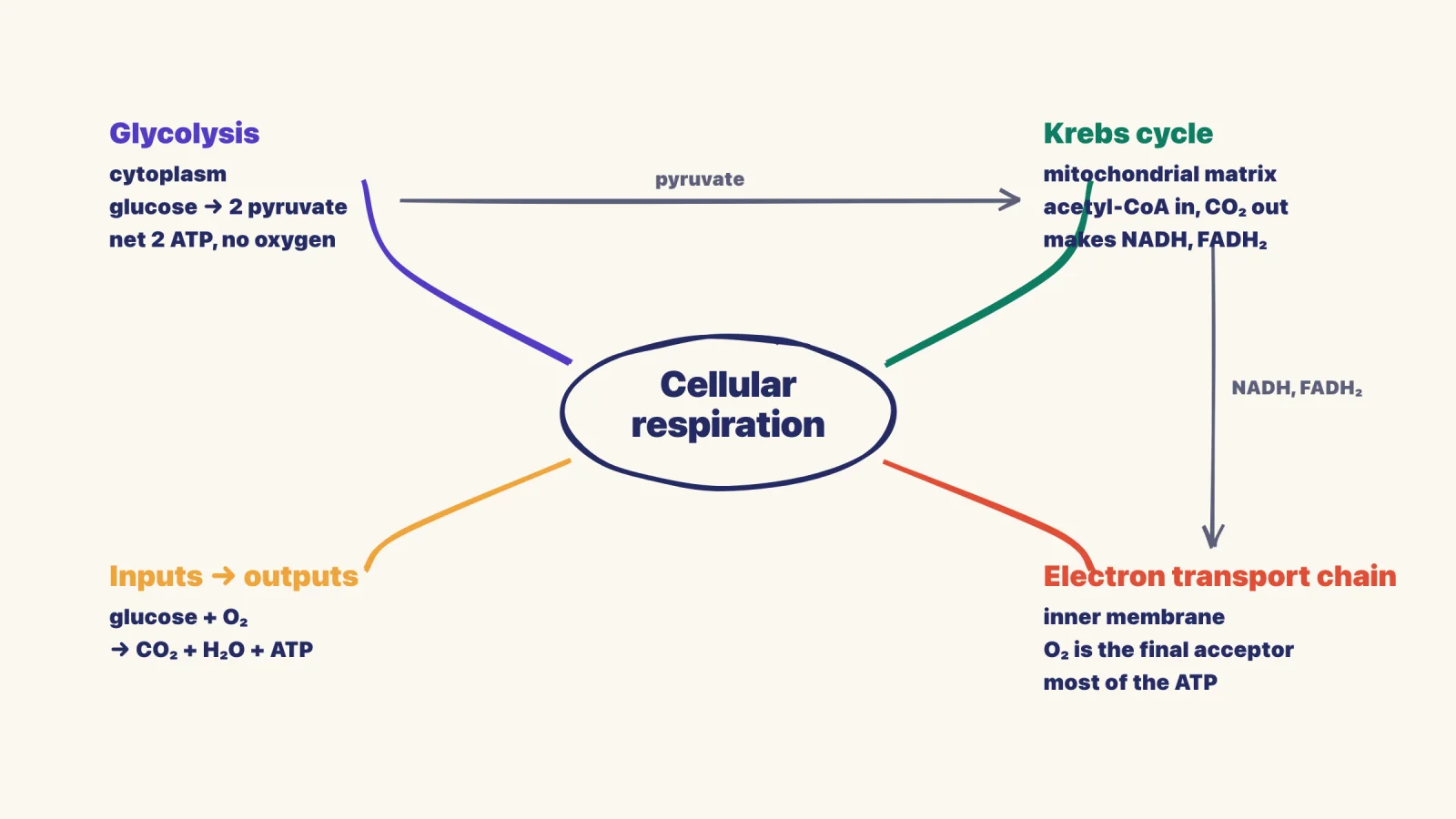
Biology: Cell respiration
Center: Cellular Respiration
Main branches: Glycolysis, Krebs Cycle, Electron Transport Chain, Inputs, Outputs, Location
Sub-branches under "Glycolysis": Location → Cytoplasm, Input → Glucose + 2 ATP, Output → 2 Pyruvate + 4 ATP, Net gain → 2 ATP, No oxygen needed
Connections: Show how outputs of glycolysis become inputs for Krebs cycle, creating a flow diagram.
Literature: "To Kill a Mockingbird"
Center: To Kill a Mockingbird
Main branches: Major Themes, Characters, Symbols, Plot Structure, Social Issues, Setting
Sub-branches under "Themes": Racial injustice → Tom Robinson trial, Loss of innocence → Scout's perspective, Moral courage → Atticus's defense, Empathy → "Walk in someone's shoes"
Connections: Link characters to themes they embody, symbols to what they represent.
Business: Market entry strategy
Center: Market Entry Decision
Main branches: Market Analysis, Competition, Resources, Risks, Entry Modes, Timeline
Sub-branches under "Entry Modes": Exporting → Low risk/Low control, Licensing → Moderate risk/Moderate control, Joint Venture → Shared risk/Shared control, Direct Investment → High risk/High control
Connections: Link risks to entry modes, resources to timeline, competition to entry mode selection.
Using mind maps for exam preparation
Three weeks before exam:
Create comprehensive mind maps for each major topic from your notes and textbook. Don't worry about perfection; focus on capturing relationships. Aim for 3-5 main branches per map with 2-4 levels of detail. This typically takes 30-45 minutes per major topic.
Two weeks before exam:
Recreate your mind maps from memory on blank paper. Check against originals and fill gaps in a different color. The gaps show what needs more study. Recreating from memory is retrieval practice, which beats rereading in study after study (Roediger and Karpicke, 2006).
One week before exam:
Create a single "master map" connecting all topics in the course. This bird's-eye view helps with synthesis questions that require pulling together multiple concepts. Many essay questions reward this type of cross-topic thinking that mind mapping naturally develops.
Day before exam:
Quick review of your master map. Don't create new maps—just refresh existing mental models. Focus on the connections between branches, as these represent the conceptual relationships most likely to appear in application questions.
Common pitfalls and troubleshooting
- Information overload: If your map becomes cluttered with too many branches and sub-branches, it loses its utility. Solution: Create separate detailed maps for complex sub-topics rather than cramming everything onto one page. Keep main maps to 5-7 primary branches maximum.
- Over-designing at the expense of content: Spending 10 minutes choosing the perfect color scheme defeats the purpose. Solution: Use a simple system—main branches get bold colors, sub-branches get lighter shades of the same color family. Done.
- Creating maps instead of using source material: Some students make maps from other students' notes or summaries without engaging with original content. Solution: Always create your first-draft maps from primary sources (lectures, textbooks, research papers), then enhance them with supplementary materials.
- Static maps that never evolve: Your first version will have gaps and errors. Solution: Treat maps as living documents. Add new connections in different colored pen as your understanding deepens. This visual evolution actually helps you see your learning progress.
- Using maps for inappropriate content: Not everything maps well. Sequential procedures, mathematical proofs, detailed statistics, or content requiring exact wording should use different formats. Solution: Know when to use lists, tables, flowcharts, or traditional outlines instead.
Advanced techniques for experienced mappers
Layered mapping: Create a high-level course overview map with 5-7 major topics. Then create detailed sub-maps for each topic, referencing back to the overview. This hierarchical approach works well for comprehensive exams or cumulative finals.
Collaborative mapping: Work with a study group where each person maps a different topic, then compare. Different people notice different relationships. Discussing why someone made a particular connection often reveals deeper insights than the map itself.
Question-driven mapping: Instead of mapping content as given, organize around potential exam questions. Center: "How did the New Deal change American government?" Main branches become your answer framework. This works exceptionally well for essay-based exams.
Temporal mapping: For historical events or process-oriented content, use the physical space on your map to represent time. Left-to-right can represent chronological progression, while vertical space shows simultaneous developments. This adds a fourth dimension to your spatial memory.
Comparative mapping: Create overlapping mind maps for similar concepts (e.g., Classical vs. Operant Conditioning, or Mitosis vs. Meiosis). The overlapping section shows similarities, distinct branches show differences. This format excels at compare-contrast questions.
Research-backed benefits and statistics
Two meta-analyses cover most of what is known. Nesbit and Adesope (2006) found a moderate advantage for learning with concept maps over reading text or outlines. Schroeder and colleagues (2018) found the advantage held across school and university students and was larger when learners constructed the maps than when they only studied them. Both are linked above.
What the research does not show is that mind maps beat the strongest study techniques. Most studies compare mapping with reading or outlining. Few compare it with practice testing or spaced review, the two techniques Dunlosky and colleagues (2013) rated most useful. That is why this guide pairs maps with flashcards instead of replacing them.
Claims that mapping "activates both hemispheres" or that pictures are processed tens of thousands of times faster than text circulate widely but have no study behind them. The honest case for mind maps is simpler: they force you to decide what connects to what, and that decision is the learning.
Integration with spaced repetition
Mind maps and spaced repetition create a powerful combination when used correctly:
- Day 1: Create your initial mind map from source material (30-45 minutes)
- Day 2: Review map, add any missing elements in different color (10 minutes)
- Day 4: Recreate map from memory, check against original (20 minutes)
- Day 8: Teach the map to someone else or explain aloud (15 minutes)
- Day 15: Quick review of original map (5 minutes)
- Day 30: Final recreation from memory (15 minutes)
This schedule leverages both the comprehension benefits of mind mapping and the retention benefits of spaced repetition. By day 30, the information is deeply encoded through multiple complementary pathways.
Addressing common objections
"I'm not a visual learner": The concept of distinct "learning styles" lacks scientific support (Pashler et al., 2008). While people have preferences, everyone benefits from multiple encoding methods. Even if you prefer text, adding visual elements creates additional retrieval cues.
"It takes too long": Initial maps do take time—30-45 minutes for a complex topic. The payoff comes later: when the structure already exists, revision is a matter of filling gaps rather than rebuilding the subject from your notes.
"My maps look messy and disorganized": Aesthetic quality doesn't predict learning effectiveness. The 2018 meta-analysis above found that maps you build yourself help more than finished maps you only study, because the building is where the understanding happens. Your imperfect map is more valuable than someone else's perfect one.
"I forget what the branches mean later": This indicates branches are too abbreviated. Use the "next week test"—if you won't understand your own keywords next week, they're too cryptic. Add a few more words or a tiny sketch for clarity.
The bottom line
Mind maps are powerful for building mental models of complex topics and seeing connections that linear notes obscure. They work best for conceptual understanding, not rote memorization. Use them early in your study process to build a framework, then fill in details with other methods like flashcards and practice problems.
The act of creating a mind map engages you more than passive review—you're organizing, synthesizing, and creating visual-spatial anchors all at once. The research shows a moderate, consistent advantage over rereading, but the real benefit is in comprehension. Students who map well can answer application and synthesis questions because they've already done the work of connecting ideas.
Start simple, use plenty of color and images, and remember: a messy map you actually use beats a perfect map that never gets reviewed. Give yourself permission to iterate—your tenth mind map will be dramatically better than your first, but that first one is still valuable learning. The technique becomes more natural with practice, eventually becoming an automatic way of organizing new information as you encounter it.
Frequently Asked Questions
Are mind maps better than flashcards?
Does mind mapping work for exam revision?
How many branches should a mind map have?
What subjects are mind maps best for?
How do I make a mind map for studying?
Should I use mind mapping software or draw by hand?
Related articles
Continue learning with these related posts.


Put these techniques into practice
Upload your study materials and let Laxu AI create flashcards, notes, and quizzes automatically.