5 Best AI Note-Taking Apps for Students in 2026
Mueller and Oppenheimer's 2014 Princeton study found something counterintuitive: students who transcribed lectures word-for-word retained less than students who summarized. That finding matters right now because most "AI note-taking apps" are built to produce beautiful transcripts — which is exactly what hurts retention. I spent a month putting 5 of these tools through real student material to figure out which ones actually help you study and which ones just capture.
Here's how they compared when I gave each the same 2-hour biology lecture audio, a 40-page textbook chapter, and a 35-minute YouTube lecture.
Quick Answer
- Want notes + flashcards + quizzes from one upload? Laxu AI. The only one that does all three. $5/mo.
- Want the best free option for research? Google NotebookLM. Seriously impressive, no credit card.
- Want a dedicated student note-taker? Polar Notes AI. Focused on student workflow.
- Already use Notion? Notion AI add-on. Good if it's already your workspace.
- Want best live lecture transcription? Otter.ai. Still the gold standard for real-time.
Why "AI note-taking" means two different things
Half the "best AI note-taking apps" articles on the internet are actually meeting-transcription tools (Otter, Jamie, Fireflies, Granola) repurposed for students. They're good at capture—turning audio into clean text—but they don't help you study the content. The other half are learning-focused tools (NotebookLM, Polar Notes AI, Laxu AI) that generate study material from the notes: flashcards, quizzes, summaries, Q&A.
The difference matters. Mueller and Oppenheimer (2014) found that students who simply transcribe lectures retain less than students who summarize and process them. A tool that gives you a beautiful transcript can actually hurt your retention if it replaces the thinking step. This guide filters out the meeting-tools-for-professionals and focuses on what students actually need: apps that help you study, not just capture.
What actually matters in an AI note-taking app
After testing all of these, here's what I actually cared about:
- Does it help me study, or just transcribe? A clean transcript is fine. A clean transcript plus flashcards and a practice quiz is better. Studies on active recall are clear—retention comes from retrieving information, not having it written down somewhere.
- Can it handle real student inputs? Audio recordings, PDFs, lecture slides, YouTube links. If it only works with typed text, it's missing half the use case.
- Are the notes structured or just a wall of text? H2/H3 hierarchy matching the lecture flow is gold. A 2-hour lecture as one giant transcript is useless.
- Can it answer questions about my notes? An AI tutor that can explain concepts based on YOUR uploaded material is way more useful than one that pulls from generic training data.
The apps I tested
1. Laxu AI — The only one that doesn't just take notes
Laxu AI was the only tool in this test that turned every upload into three study artifacts: clean structured notes, flashcards, AND a practice quiz. I uploaded the 2-hour biology lecture and got back a 900-word summary, 28 flashcards, and an 18-question quiz in about 3 minutes.
Transcription accuracy was strong (98% word-level). More importantly, the notes weren't a wall of transcribed text—they had H2/H3 sections matching the lecture flow, with "key terms" callouts and "likely exam topics" highlighted. That structure is what actually helps you study, not a perfect transcript.
Where Laxu AI pulls ahead: the built-in AI tutor can answer questions about your uploaded material. I asked "why does glycolysis happen in the cytoplasm and not the mitochondria?" and got a conceptual answer grounded in my actual lecture material. That's way more useful than generic textbook explanations.
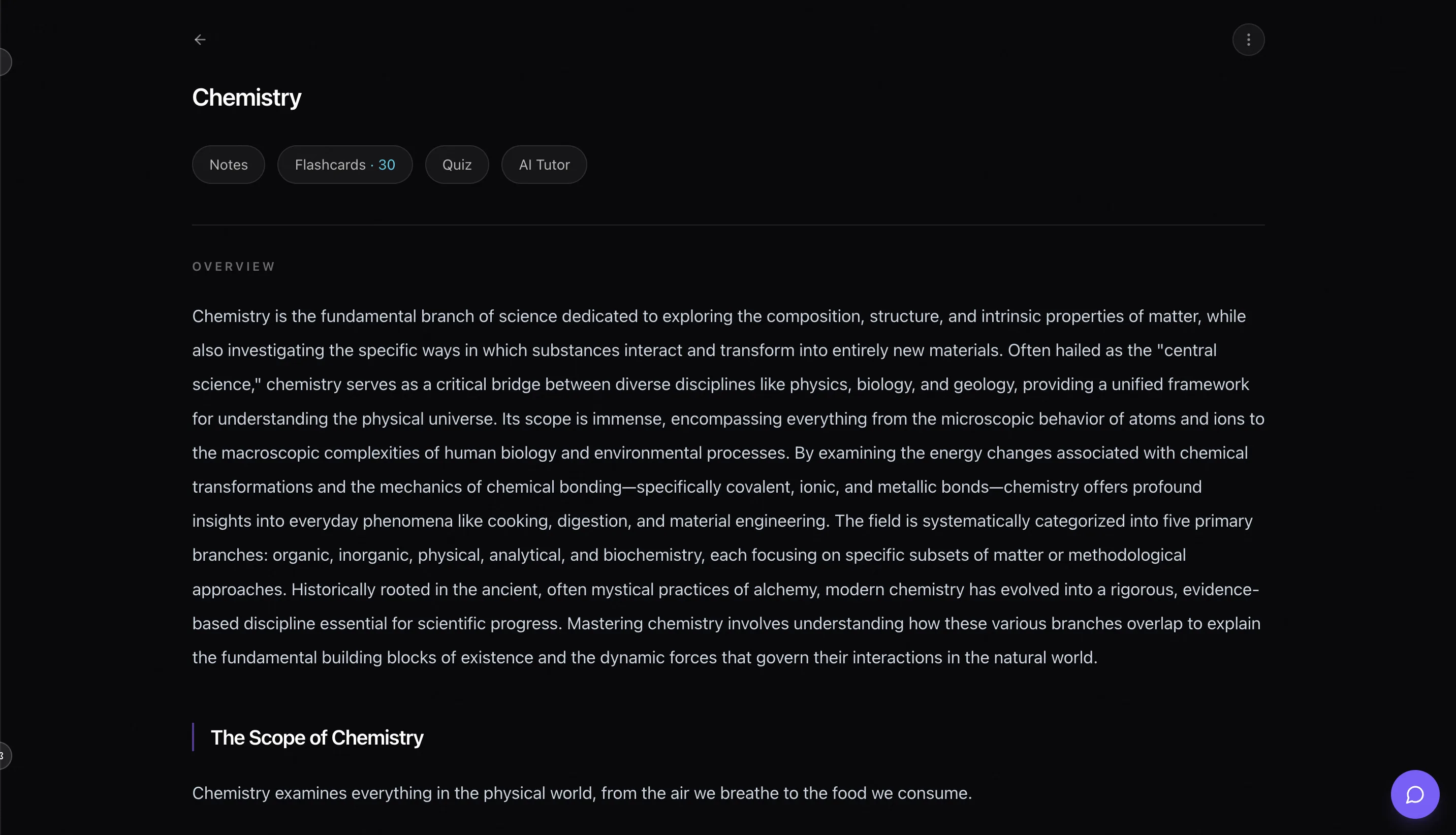
- What I liked: Accepts PDF, photos, audio, YouTube links. Generates notes + flashcards + quizzes from one upload. AI tutor trained on your uploads. Built-in spaced repetition. Works in 5 languages. Native iOS app.
- What I didn't like: Notes aren't as long-form as NotebookLM's for heavy research work. No handwriting capture (use GoodNotes for that). No team collaboration.
- Who should use it: Any student who wants lecture capture AND a study system in the same tool—not three separate subscriptions. Especially great if you record lectures or use YouTube content.
- Cost: 1 free upload. Then $1.99/week, $4.99/month, or $39.99/year.
Try the AI notes tool free — no credit card.
2. Google NotebookLM — Best free option, genuinely impressive
Google NotebookLM is genuinely impressive and genuinely free (within generous limits). The killer feature is multi-source grounding: upload 10 PDFs, 5 slide decks, and a YouTube link, and it will answer questions across all of them with citations pointing back to the exact source. For research-heavy workflows, nothing else comes close for free.
The Audio Overview feature is wild—it turns your notes into a 10-15 minute podcast-style discussion between two AI hosts. Surprisingly good for passive review on a commute.
For pure study workflows it's a bit weaker. The Study Guide feature is solid, but there's no flashcard system, no quiz retake loop, no spaced repetition scheduling. You have to export the study guide and build your own retrieval practice on top of it. That extra step is where most students drop the habit.
- What I liked: Free with very generous limits. Multi-source grounding with precise citations. Audio Overview podcast feature. Handles up to 50 sources per notebook.
- What I didn't like: No integrated flashcards or quiz retake loop. Study Guide is generated on demand, not persistent. Mobile UX isn't optimized.
- Who should use it: Research-heavy coursework, grad students, thesis writing, anyone synthesizing across multiple sources. Also excellent as a secondary tool alongside a flashcard/quiz app.
- Cost: Free tier covers most students. Google One subscribers get higher limits.
3. Polar Notes AI — Dedicated student note-taker
Polar Notes AI is the cleanest student-only UI in the test. Upload a lecture or slides, get structured notes, a study pack, and a quiz. It's purpose-built for the lecture-to-study-material workflow and nails the basics. The notes quality was strong, and I liked that it surfaces "key terms" and "likely exam questions" as separate sections.
Where it lags: no multimodal input beyond text and PDF (no audio, no YouTube), no AI tutor to ask follow-up questions, and the pricing is a bit higher than Laxu AI for roughly the same student-focused feature set. If you work only from PDFs and slides, it's excellent. If you record lectures or use YouTube content, Laxu AI or NotebookLM will handle more of your material.
- What I liked: Clean student-first UI. Strong note structure. "Likely exam questions" is a genuinely useful feature. Focused on studying, not meeting notes.
- What I didn't like: No audio or YouTube input. Pricier than Laxu AI with less breadth. No flashcard export to Anki.
- Who should use it: Students who only work from PDFs and slides and want a clean dedicated tool without an ecosystem.
- Cost: Paid plans ~$10-15/month.
4. Notion AI — Good if you already live in Notion
If you already use Notion for tasks, projects, and class organization, Notion AI is a natural extension. Paste a lecture transcript or upload a PDF and ask Notion AI to summarize, outline, or pull key points. The output is fine, not extraordinary. Where Notion AI wins is integration: your study notes live next to your assignment tracker, your reading list, your flashcard databases—everything in one workspace.
The downside: Notion AI is an add-on, not the primary workflow. It can't transcribe audio natively. You have to feed it text. And Notion itself has a learning curve if you're not already using it. For a student starting fresh, dedicated student tools are faster.
- What I liked: Excellent if Notion is already your home base. Flexible, formats output however you want.
- What I didn't like: Not native audio support. Not designed for studying specifically. $10/month adds up quickly. Learning curve for non-Notion users.
- Who should use it: Students already using Notion as their main workspace—don't fragment your tools.
- Cost: Notion free; Notion AI add-on $10/month.
5. Otter.ai — Best for live lecture transcription
Otter has been the gold standard for live transcription for years and still is in 2026. If your primary need is "record my lecture and get a clean transcript and summary afterward," Otter is hard to beat. The new AI summary feature produces usable recap notes. It integrates with Zoom and Google Meet so it can join online lectures automatically.
But it's a transcription tool, not a study tool. You get a transcript and a summary. You don't get flashcards, you don't get a practice quiz, you don't get a retrieval-practice loop. For a student, Otter is step 1 of a 3-step study system—and the other 2 steps are on you.
- What I liked: Best-in-class live transcription accuracy. Meeting/class auto-join. Strong search across recordings.
- What I didn't like: No study system layer. Pricing can get steep. Built for meetings, not studying specifically.
- Who should use it: Students who need reliable live transcription and will build their own study layer afterward—typically pairing Otter with Anki or Laxu AI.
- Cost: Free tier with limits; paid from $8.33/month.
Comparison table
| App | Best For | Monthly Price | Audio Input | Study System |
|---|---|---|---|---|
| Laxu AI | Notes + flashcards + quizzes in one | $4.99/mo | Yes | ★★★★★ 5/5 |
| Google NotebookLM | Research and comprehension | Free | Yes | ★★★★★ 3/5 |
| Polar Notes AI | Dedicated student notes | ~$10-15/mo | No | ★★★★★ 3/5 |
| Notion AI | All-in-one workspace | $10/mo add-on | No | ★★★★★ 2/5 |
| Otter.ai | Live lecture transcription | From $8.33/mo | Yes | ★★★★★ 2/5 |
The free option is genuinely great (but incomplete)
Google NotebookLM is surprisingly good for free. If you're research-heavy or working across many sources, it might be all you need. But it stops at notes and a study guide—there's no built-in flashcard deck, no practice quiz retake loop, no spaced repetition. Students who want the full study system still need a separate tool.
If you want one app for everything, Laxu AI. If you want the best free option and don't mind stitching tools together, NotebookLM.
So which one should you actually use?
After testing all of these, here's my honest take:
If you record lectures and want a full study system: Laxu AI. Notes + flashcards + quizzes from one upload beats running three separate tools, especially at $4.99/month.
If you do research or write a thesis: Google NotebookLM. Multi-source grounding with citations is unmatched, and it's free.
If you already live in Notion: Notion AI. The integration is the point—don't fragment your workspace.
If you want dedicated student notes without audio: Polar Notes AI. Good if you only work from PDFs and slides.
If you mostly need live lecture transcription: Otter.ai. Best in class for capture, pair it with something else for review.
My recommendation
Start with Laxu AI's free upload. Upload a real lecture (audio, PDF, or YouTube) and see what you get back—structured notes, flashcards, and a quiz all from one file. If that output is useful, $5/month is easily worth it for the whole system. If you only need notes (no flashcards or quizzes), NotebookLM is the best free fallback.
What I wouldn't do: pay $10+/month for a tool that only produces notes. The market has shifted—the same price point ($5-10/month) now gets you a full study system. Notes without a retrieval-practice loop are just fancy archiving.
This guide is also available in Spanish if that's helpful.
Want to try Laxu AI? Upload your first file free — no credit card, no commitment. See if the full notes + flashcards + quizzes loop is actually useful before you pay anything.
Frequently Asked Questions
What is the best AI note-taking app for students in 2026?
Is there a free AI note-taking app?
Can AI take notes from a lecture recording?
What's the difference between Laxu AI and Google NotebookLM?
Can AI note-taking apps summarize YouTube videos?
Should I use AI notes or take notes manually?
Is Notion AI a good note-taking app for students?
Which AI note-taking app has the best free tier?
Related articles
Continue learning with these related posts.

Put these techniques into practice
Upload your study materials and let Laxu AI create flashcards, notes, and quizzes automatically.